Notifications and Event History
Event Log
The Log tab allows you to view the event history from the panel. Each entry includes the event type (e.g., arming, disarming, alarm), the associated partition or system component, the user, and the date and time.
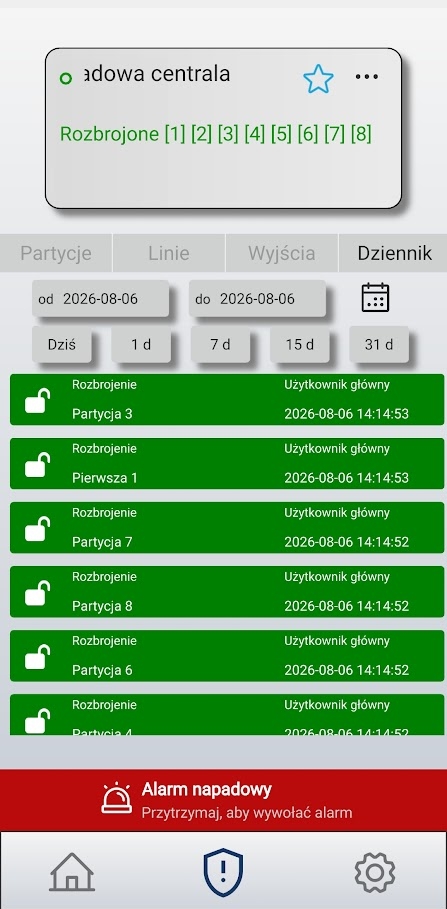
You can narrow down the list of events using a time filter:
- date range from / to (select from the calendar),
- quick filters: Today, 1 day, 7 days, 15 days, 31 days.
Events are displayed starting with the most recent. The color of the entry (and the associated icon) indicates the type of event:
- Green — disarmed
- Orange — arming
- Red — alarm
- Yellow — trouble or technical event
Push Notifications: How They Work and Types
In addition to the log, the BCS ONE app notifies users of system events via push notifications on their phones. This ensures that users receive alerts even when the app is not open.
Typical notifications include, among others:
- alarms (intrusion, tamper alarm, etc.),
- arming and disarming partitions,
- troubles and system messages.
Warning
The app uses loud, high-priority notifications that can wake up your phone even in Do Not Disturb mode. When you launch the app for the first time, you must grant the required system permissions—without them, some notifications may not work. Details are described in the introduction, in the Requirements and Compatibility section.
Notification settings also depend on your phone’s operating system (Android / iOS). Make sure that notifications for BCS ONE are not disabled in your device’s settings and that the app is not restricted by power-saving modes.